
DocuWrit
Not the best PDF filler you can get. Definitely one of the cheapest. Fill, sign and edit PDFs on Windows — free for anyone, for any use, with the source code included.
The honest pitch.
Most people need to fill in a form, sign it, and send it back. That should not need a subscription.
What it does well
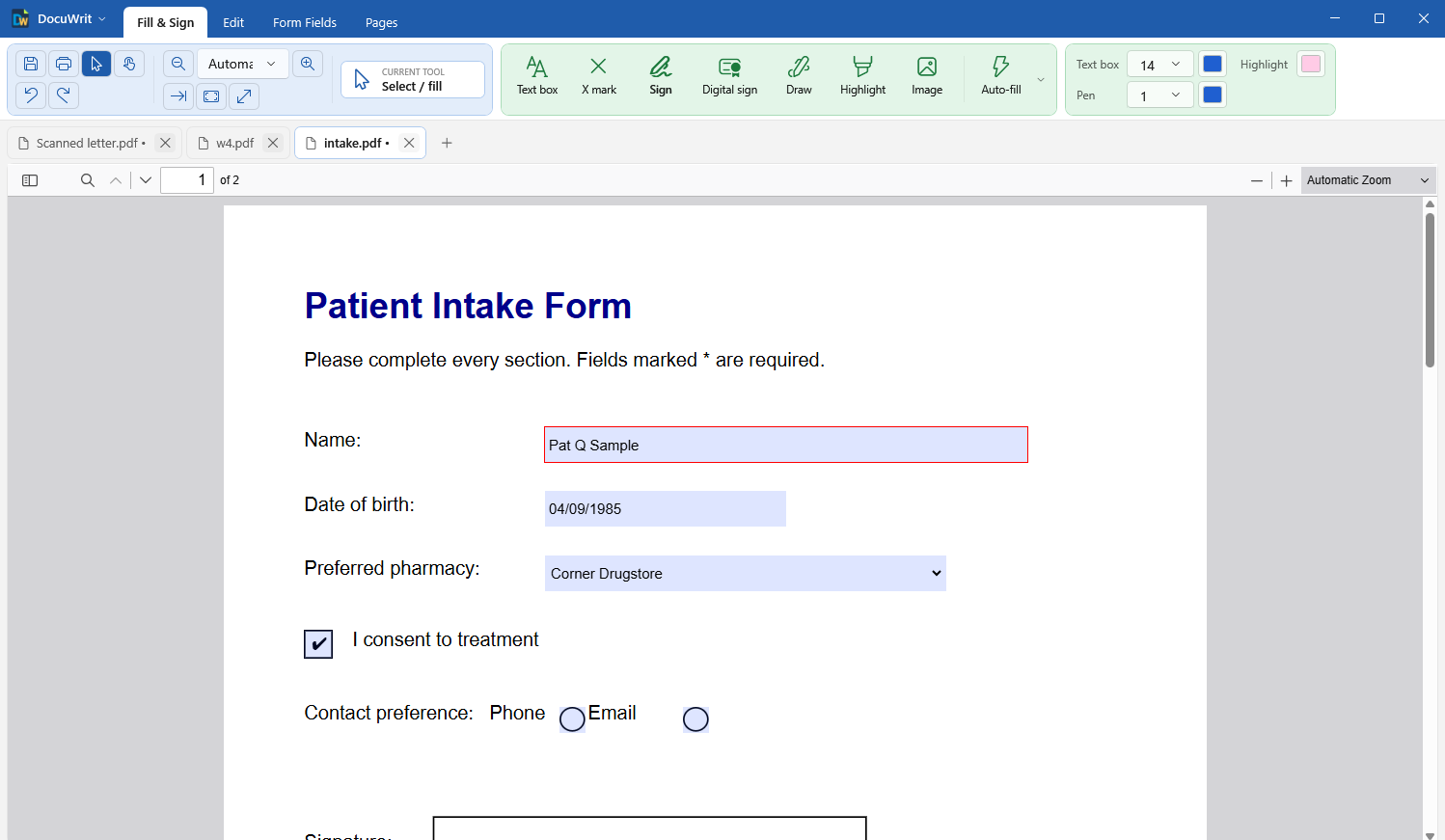
Fills real PDF forms, lets you type and tick on forms that are only a picture of a form, places your signature, and saves a normal PDF anyone can open.
What it costs
Nothing. No trial, no account, no watermark, no “pro” edition. Home, office, commercial, government — same download, same price: zero.
What it is not
A replacement for the big commercial PDF suites. No redaction, no comments, no password protection, and its text recognition is a helper, not a proofreader. The full list of gaps is right on this page.
What you get
One small installer. Everything below is in it.
Fill & Sign
Fill form fields, type anywhere on a page in the size and colour you pick, put an X in printed check boxes, draw, highlight, add pictures. Sign with a saved, drawn, typed or uploaded signature.
Digital signatures
Sign with a digital ID — your own certificate, or a free self-signed one made in seconds. The signature proves the document was not changed afterwards. Several people can sign one document, and signatures in documents you receive are checked when you open them.
Auto-fill
Enter your name, address, date of birth — or a doctor's NPI and practice details — once. One click then puts them into the fields of a form that ask for them. Keep a set of values per person, clinician or business.
Edit page text
Change text that is already on the page, restyle it, add new text, move or delete page items. Undo and redo are built in.
Build fillable forms
Add text fields, check boxes, radio buttons, dropdowns, signature fields and buttons to any PDF. Pick fonts, make fields hidden or read-only, change many fields at once, then flatten when the form is final.
Totals and formats without code
Make a field the sum or product of other fields by ticking them. Format fields as numbers, money, percentages, dates, phone numbers or ZIP codes. Stored the standard way, so other PDF programs understand it.
Form scripts, with your say-so
Calculated totals, validation and other JavaScript built into a PDF form work — but only after you allow it for that document, and then in a sandbox that cannot reach your files or the network.
See and edit a form's scripts
One window lists every script a PDF carries — without running any of them. Change them, add your own, and let the built-in check catch typing mistakes and code that cannot work in a PDF before it is saved.
Text recognition (OCR)
Turn a scan into a document you can search: DocuWrit reads the text of scanned pages and lays it invisibly over the picture, so it can be found, selected and copied. It happens on your PC — no page ever leaves it. English, Spanish, French and German included.
Organize pages & export
Drag pages into a new order, rotate and delete them, pull pages out into a new document, split a file into single pages, insert or combine PDF files. Export pages as PNG, JPEG or TIFF pictures, or their text as a .txt file.
DocuWrit Printer (optional)
Print from any program and save the result as a PDF, as pictures or as text — or open it straight in DocuWrit to fill in and sign. Tick it in the installer if you want it.
See it in action
The whole product. Nothing held back for a paid edition, because there isn't one.
Fill & Sign
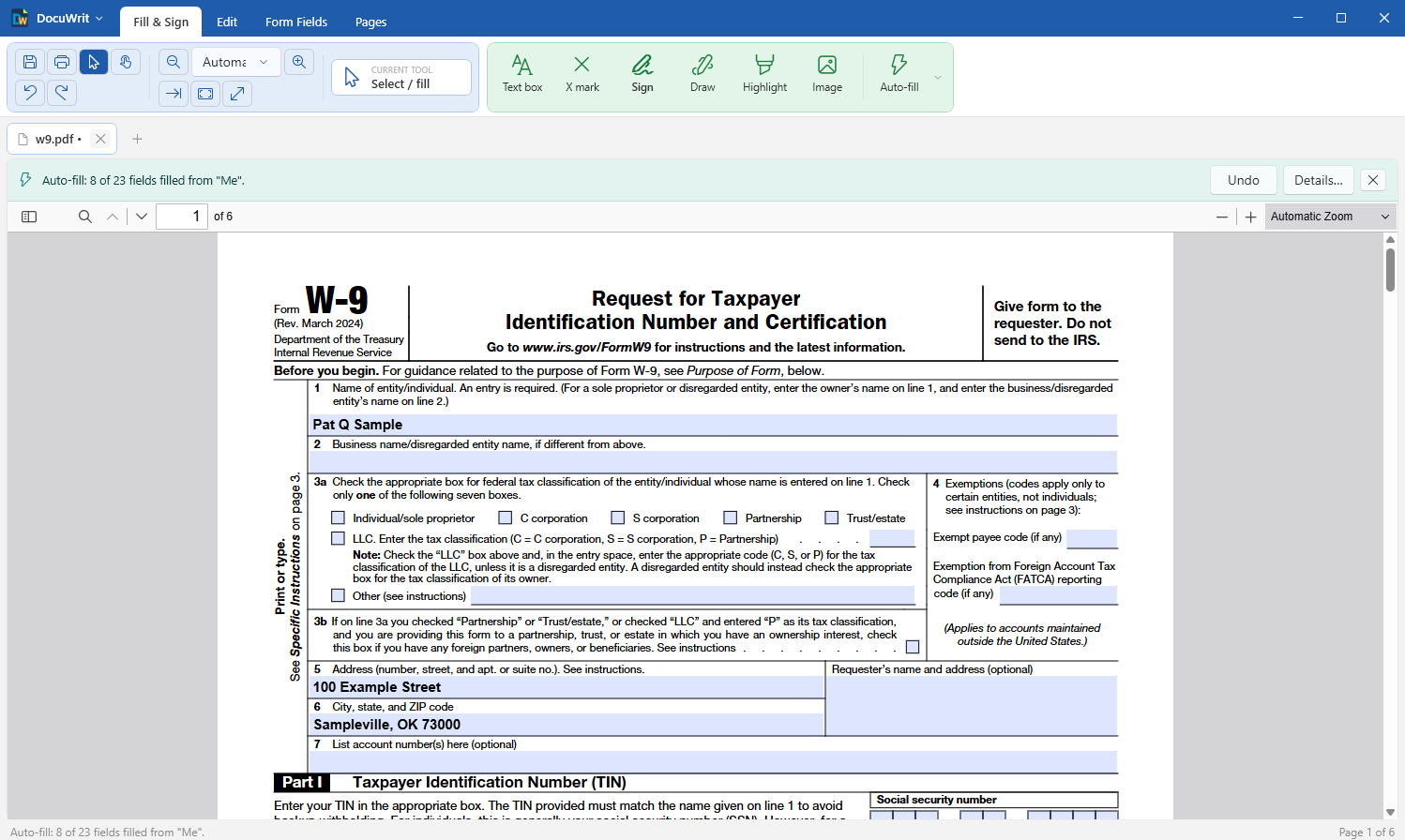
Auto-fill: one click, with Undo and a list of what was filled
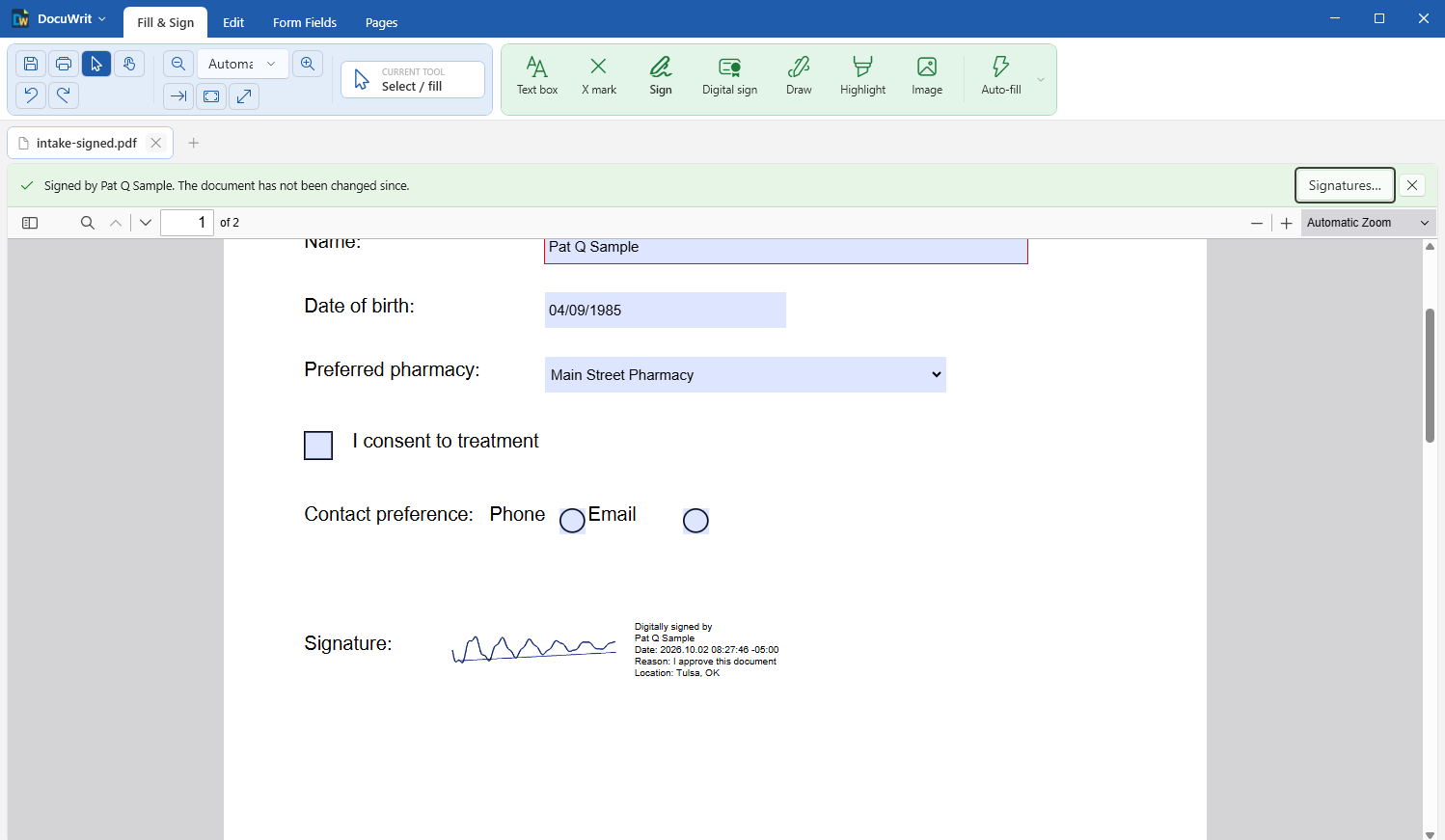
Digital signature: sealed with a digital ID, checked when the document opens
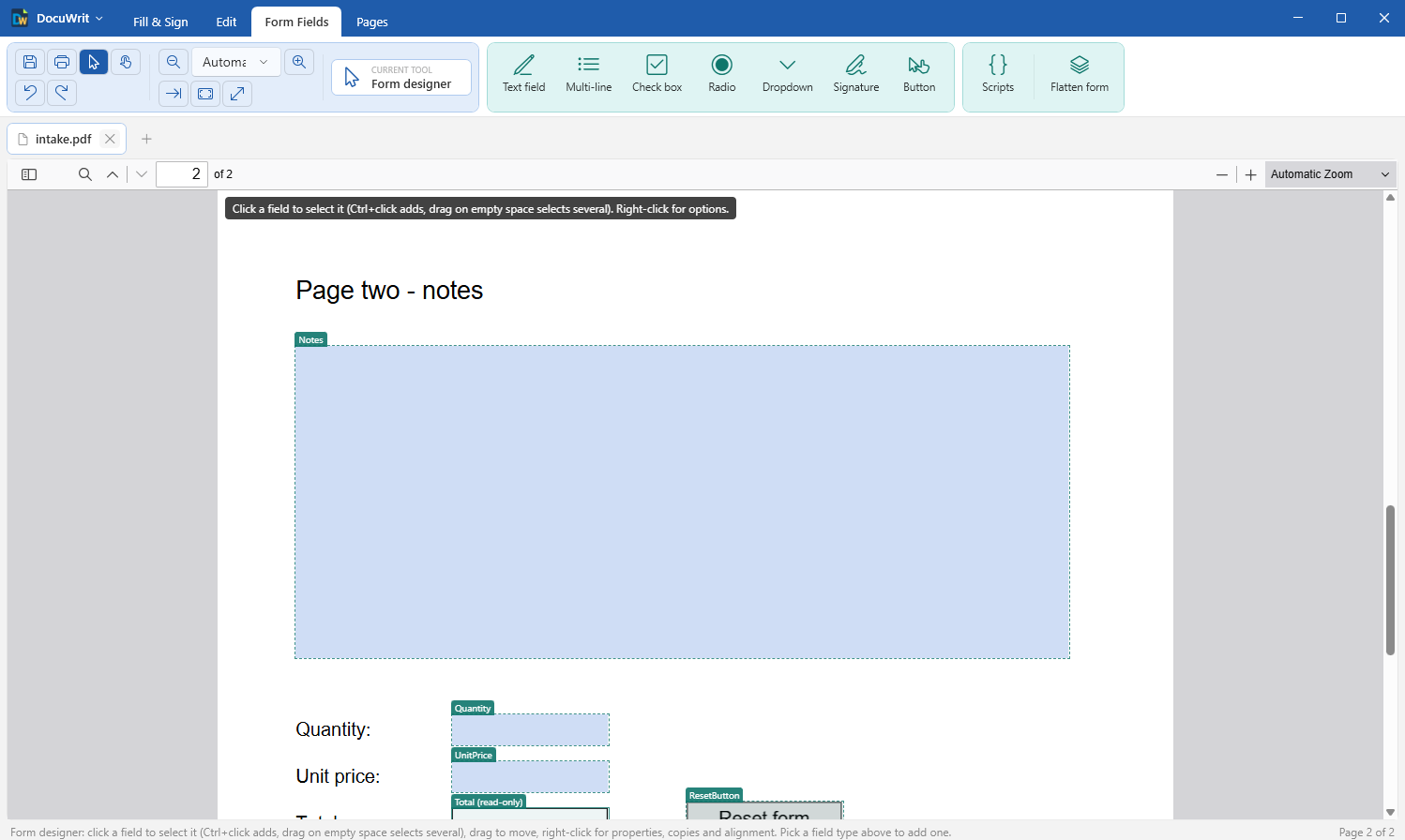
Form designer
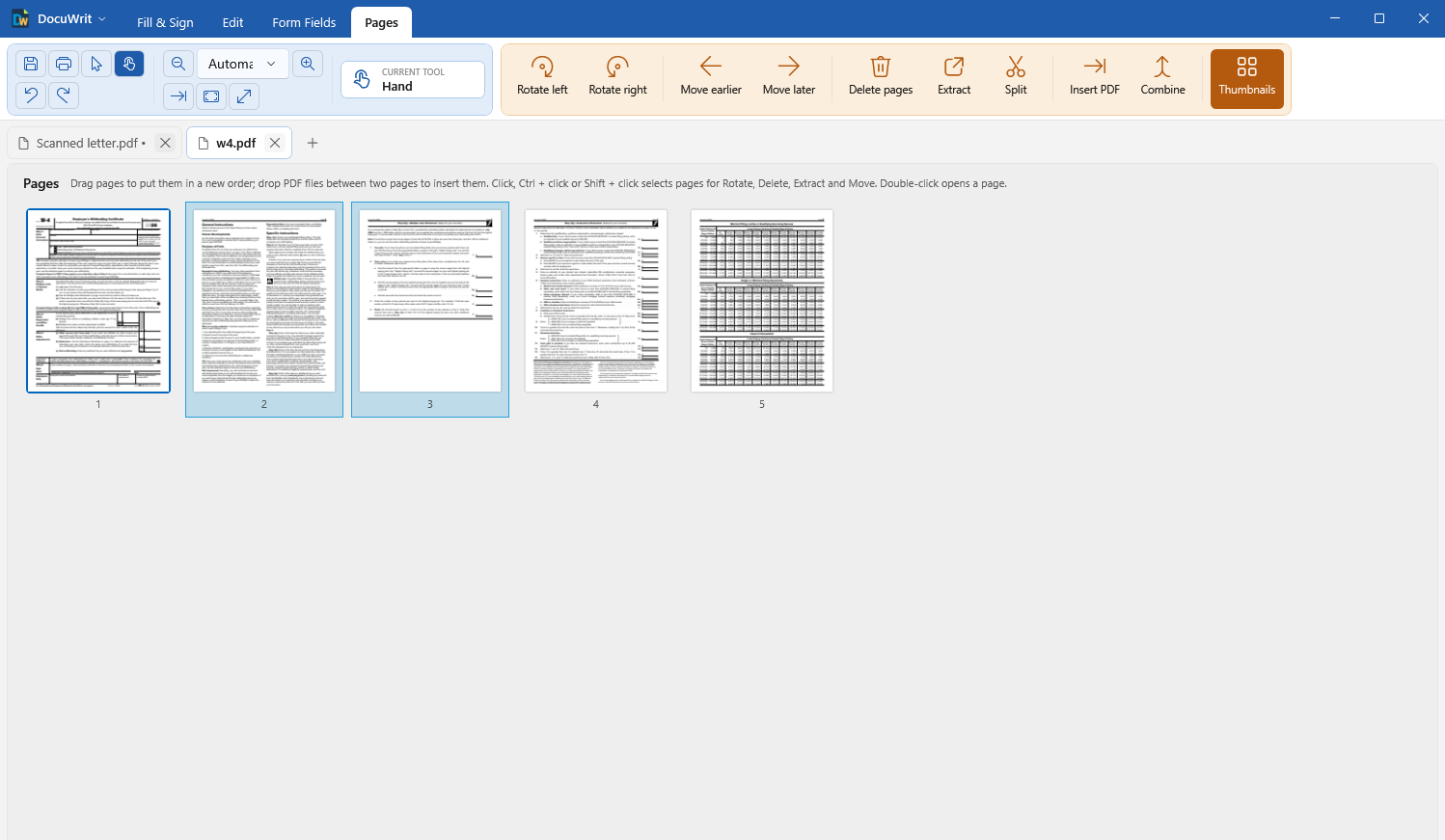
Organize pages: drag them into order, extract, split, combine
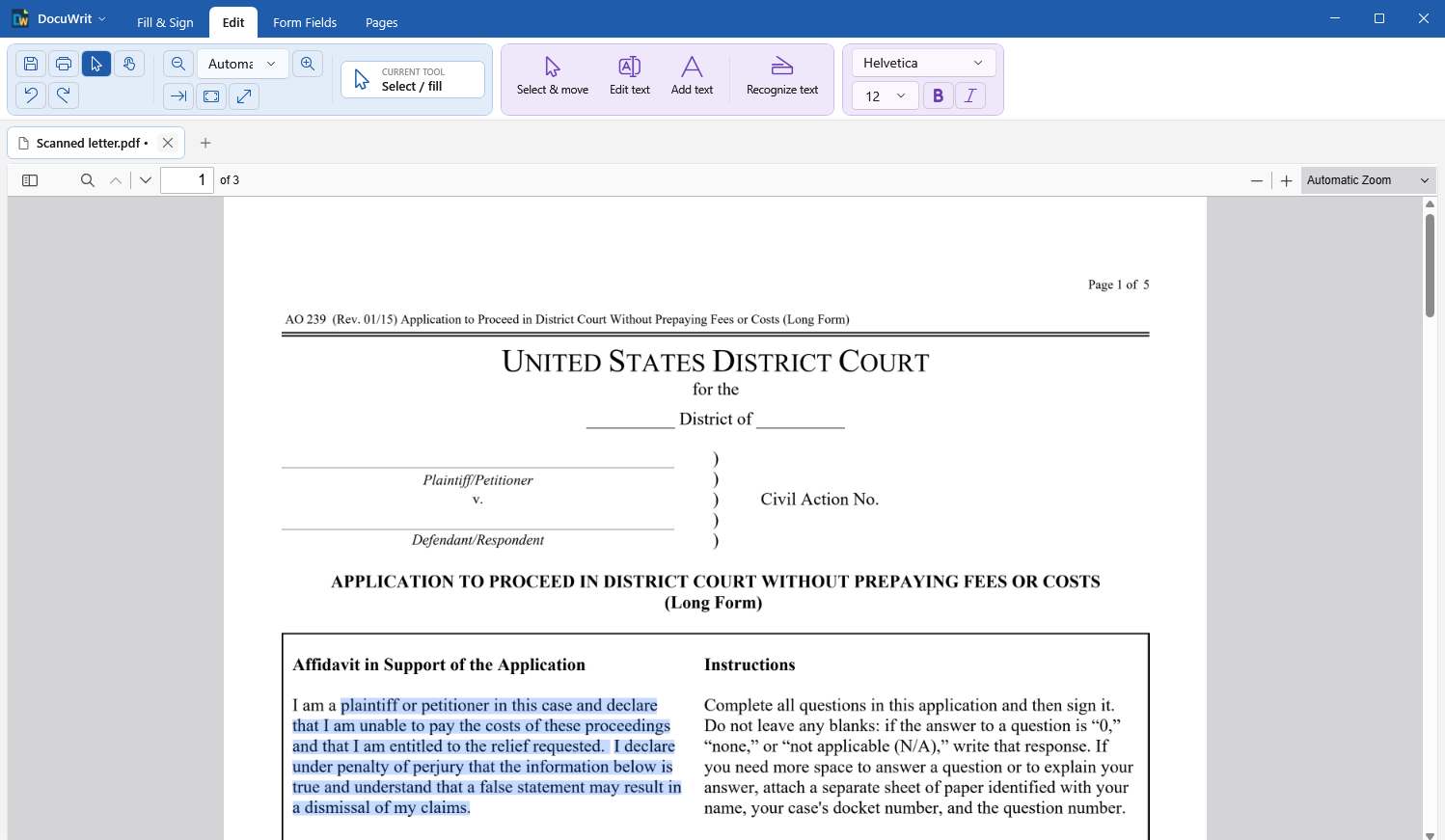
Text recognition: a scan whose text can be searched, selected and copied
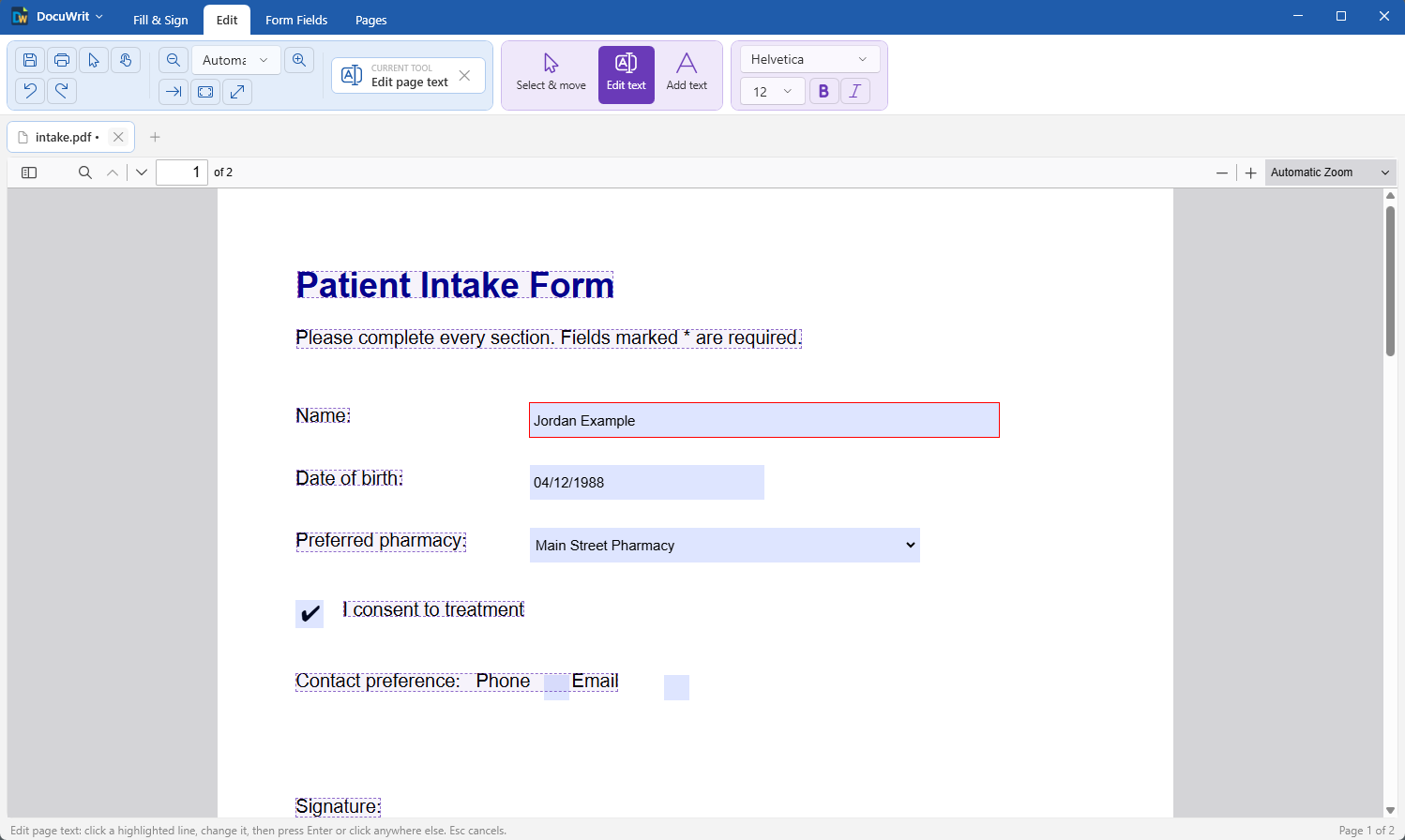
Edit page text
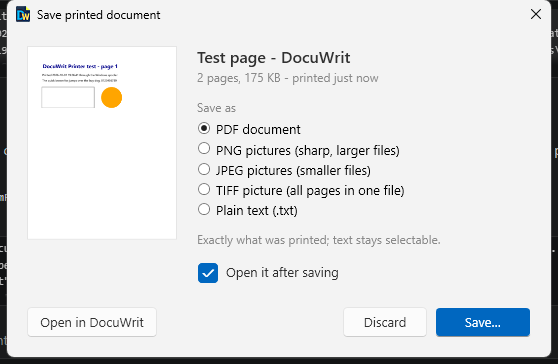
DocuWrit Printer: save what you printed as PDF, picture or text
Examples
Things a plain PDF form can do with nothing but its own JavaScript.
PixelBinary: a PDF that draws its own QR code and Data Matrix code
A fillable PDF where the barcode is not a picture: type into a form field and the QR code and the Data Matrix code redraw themselves from what you typed. No barcode plug-in, no paid add-on — a free font and a little JavaScript inside the PDF.
Download
DocuWrit v0.6.0
For Windows 10 and Windows 11 (64-bit).
Download JimRan-DocuWrit-Setup-v0.6.0.exeAbout 56 MB. Installs for all users of the PC, about 180 MB on disk.
SHA-256: 732CE64284648A764D20A6EAF5C29AB5151C0994A055D75BB9229D0A48DCF7CB
System requirements
- OS: Windows 10 (version 1809 or later) or Windows 11, 64-bit
- Disk: about 180 MB
- Privileges: Administrator, to install (it installs for all users)
- Also needed: the Microsoft Edge WebView2 Runtime. It is part of Windows 11 and of up-to-date Windows 10; if it is missing, the installer downloads it from Microsoft.
- For text recognition: the Microsoft Visual C++ runtime. Most PCs have it; if it is missing, the installer downloads it from Microsoft.
- For the optional printer: the Windows feature “Microsoft Print to PDF” (on by default)
Install
- Download the installer above and run it.
- The installer is code-signed by JimRan LLC; the publisher name shows in the Windows prompt. Windows may still show “Windows protected your PC” for a while after a new release, until Microsoft has seen enough downloads: choose More info, then Run anyway. If in doubt, compare the file's SHA-256 with the one shown above.
- Tick Install the DocuWrit Printer if you want to print to DocuWrit from other programs. You can add or remove it later from the DocuWrit menu.
- Start DocuWrit and open a PDF. To make it your default PDF app, use DocuWrit menu > Make DocuWrit the default PDF app.
Uninstalling (Windows Settings > Apps) removes the program and the printer. Your settings and saved signatures are kept.
Use at your own risk. DocuWrit is provided as-is, without warranty of any kind, as the license below says. Keep a copy of any document that matters before you edit it.
Privacy
DocuWrit has no account and no telemetry, and it never contacts a server on its own. Your documents are opened, edited, read by the text recognition and saved on your computer only. Two things use the internet, each only when you ask: a time stamp for a digital signature contacts the time-stamp server you choose and sends it a fingerprint of the signature, never the document; and DocuWrit menu > Check for updates fetches one small file from jimran.com — the request carries the DocuWrit version and nothing about you or your documents. Links inside a PDF open in your web browser when you click them. A document's own scripts stay switched off until you allow them. Nothing you print to the DocuWrit Printer leaves your PC.
This website counts downloads; see the Privacy Policy.
What it can't do (yet)
Better you read it here than find out halfway through a job.
- Text recognition is good, not perfect. A clean scan of printed text is read almost without mistakes; a poor fax, small print or handwriting is not. The recognized text is for searching and copying — it cannot be edited as page text, and the picture of the page is never changed. Details.
- Digital signatures are the basic kind. DocuWrit signs with a digital ID and checks signatures, but it does not embed long-term validation data, does not check whether a certificate was revoked, and is no “send for signature” service. A free self-signed ID has to be trusted by each reader. Details.
- No redaction, no comments or sticky notes, no shapes.
- Page tools cover the basics. Reorder, rotate, delete, extract, split, insert and combine work. Combined files keep their pages and fill-in fields, but not the bookmarks and scripts of the added files; there is no cropping and no page numbering.
- Restricted (“secured”) forms stay restricted. Many official forms allow filling in but no changes. DocuWrit lets you fill, annotate, sign and print them, and tells you plainly when a tool (page changes, text editing, the form designer) is not allowed by the form's author. It cannot open PDFs that need a password, and it cannot add one.
- Text editing works line by line. It does not reflow paragraphs, and a line may be re-set in a standard font when the original font is embedded only partially.
- Auto-fill is a helper, not a clerk. It leaves a field empty when it is not sure, and it can still put a value into the wrong field. On our test set of about a hundred real forms roughly 9 of 10 values it filled were right. Look over what it filled; Undo and Details are on the bar above the document.
- Windows only.
If one of these is a deal-breaker, a commercial PDF suite is the right tool. If not, this one is free.
Free for every use. Source included.
DocuWrit is open source under the MIT License — not the freeware license our other products use.
Use it anywhere
Personal, commercial, government, education. No registration and no limit on the number of PCs or users.
Change it, share it, sell it
Modify the code, redistribute it, build it into your own product. The only condition is to keep the copyright and license notice with it.
Source code
The complete source for this release, including the build and installer scripts:
Download JimRan-DocuWrit-Source-v0.6.0.zip
SHA-256: F162E45ACE885EA61F72B60AA3160455CFECCE7AFEBDFC2F4370F8217E12EDEE
About 9 MB. C# / WPF on .NET 10; README.md inside explains how it is built and how to build it.
The license
Credits: built on other people's work
DocuWrit is a shell around open-source projects that do the hard parts. It would not exist without them, and we are grateful to everyone who built them. Every one is open source under its own license; the full license texts are installed with the program (DocuWrit menu > Credits and licenses) and are in the source download.
| Project | By | Used for | License |
|---|---|---|---|
| pdf.js | Mozilla Foundation and contributors | Viewing, form filling, form JavaScript, annotations | Apache-2.0 |
| PDFium | The PDFium Authors (Google, Foxit) | Text editing, flattening, thumbnails, export | BSD-3-Clause, Apache-2.0 |
| pdfium-binaries | Benoit Blanchon | The pre-built PDFium library | MIT |
| PDFiumCore | Dtronix | .NET bindings for PDFium | Apache-2.0 |
| PDFsharp | empira Software GmbH | Form fields, page operations | MIT |
| QuickJS | Fabrice Bellard, Charlie Gordon | The sandbox that runs form scripts (inside pdf.js) | MIT |
| Tesseract OCR | Ray Smith, Google and contributors | Text recognition, with its language data (tessdata_fast) | Apache-2.0 |
| Leptonica | Dan Bloomberg and contributors | The picture library Tesseract works with | BSD-2-Clause |
| .NET runtime and WPF | .NET Foundation and contributors, Microsoft | The runtime the program runs on | MIT |
| .NET Community Toolkit | .NET Foundation and contributors | Application plumbing | MIT |
| WebView2 SDK | Microsoft | Hosts the viewer | BSD-3-Clause |
| Inno Setup | Jordan Russell, Martijn Laan | The installer | Inno Setup License |
And the libraries inside them: FreeType (The FreeType Project), libjpeg-turbo (Independent JPEG Group, D. R. Commander), OpenJPEG (Université catholique de Louvain), ICU (Unicode, Inc.), Little CMS (Marti Maria), libpng, zlib (Jean-loup Gailly, Mark Adler), Abseil (Google), Anti-Grain Geometry (Maxim Shemanarev), fast_float, simdutf, LLVM libc, BigGustave (Eliot Jones), qcms (Mozilla), Adobe's character maps, the Foxit fonts, and the pdf.js viewer translations by Mozilla's localization community (MPL-2.0).
This software is based in part on the work of the Independent JPEG Group. Portions of this software are copyright © 1996–2026 The FreeType Project (www.freetype.org). All rights reserved.
Nothing in DocuWrit is under the GPL, LGPL or AGPL. The Microsoft Edge WebView2 Runtime it runs on is part of Windows and is not distributed with DocuWrit.
PDF, Adobe and Acrobat are trademarks of Adobe Inc. Microsoft, Windows and Edge are trademarks of the Microsoft group of companies. DocuWrit is not affiliated with or endorsed by any of them.